Learning how to delete Booksy account is a straightforward process that allows users to manage their online presence effectively. In this guide, we’ll walk you through the essential steps for a seamless account deletion process.
Embracing the convenience of Booksy, the free online appointment booking app tailored for seamless interactions with barbers and beauty professionals, has undoubtedly enhanced your access to local beauty, wellness, and health services. Yet, as needs and preferences evolve or change, so might your online experience with Booksy.
If you’ve decided it’s time to bid farewell to your Booksy account, we are here to help you. In this article, we’ll navigate the steps on how to delete Booksy account, ensuring a smooth deletion process.
Table of Contents
Before you Begin
Before saying goodbye to your Booksy account, it’s essential to pause and prepare. Let’s explore some key considerations that will ensure a smooth deletion process.
- Review upcoming appointments:
Before starting the deletion process, take a moment to check your Booksy account for any upcoming appointments. Ensure that you’ve made note of important dates, especially if you have scheduled beauty services like haircuts or beard trims. - Retrieve transaction history and utilize remaining credits
Access your transaction history within the app. Keep a record of any financial transactions related to the services you have booked through Booksy. This step is crucial for your records and helps in the case of payment refunds. - Save contact information:
If you’ve connected with specific beauty professionals or salons through Booksy, consider saving their contact information separately. This can be useful if you plan to continue using their services or need to get in touch with them in the future. - Inform your service providers:
If you have regular service providers or businesses you frequent through Booksy, consider informing them of your decision to delete your account. This helps maintain a positive relationship with the professionals you’ve connected with through the app.
By addressing these points before you proceed with the deletion, you can ensure a hassle-free transition and retain important information for future reference.
How to Delete Booksy Account: 3 Easy Methods
Booksy doesn’t make it easy for a user to delete their account. There is no direct way for a user to delete their account through the in-app settings
You’ll have to get in touch with Booksy (email at [email protected] or fill out their support form here) to get your account deleted. Below, we’ve listed how you can do that and also provided an email template to help you get your Booksy account deleted permanently.
In this section, we look at three distinct methods: how to delete booksy account via email, how to delete booksy account through the Booksy website, and one bonus method.
Now, let’s take a closer look at each method to understand the process in detail.
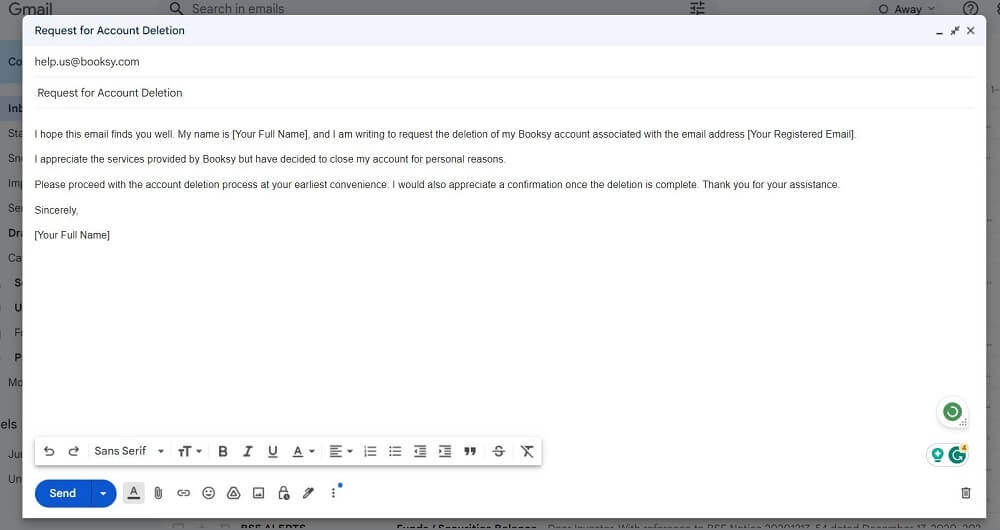
Method 1: How to delete Booksy Account by sending an Email
If you prefer the convenience of email communication, deleting your Booksy account is a straightforward process.
Follow the template given below to delete your Booksy account
Subject: Request for Account Deletion Dear Booksy Support Team,
Body:
I hope this email finds you well. My name is [Your Full Name], and I am writing to request the deletion of my Booksy account associated with the email address [Your Registered Email].
I appreciate the services provided by Booksy but have decided to close my account for personal reasons. Please proceed with the account deletion process at your earliest convenience. I would also appreciate a confirmation once the deletion is complete. Thank you for your assistance.
Sincerely,
[Your Full Name]
Method 2: How to Delete Booksy Account through Booksy Website
Steps to delete Booksy Account via Website:
- Login to Your Booksy Account: Begin by logging in to your Booksy account using your credentials.
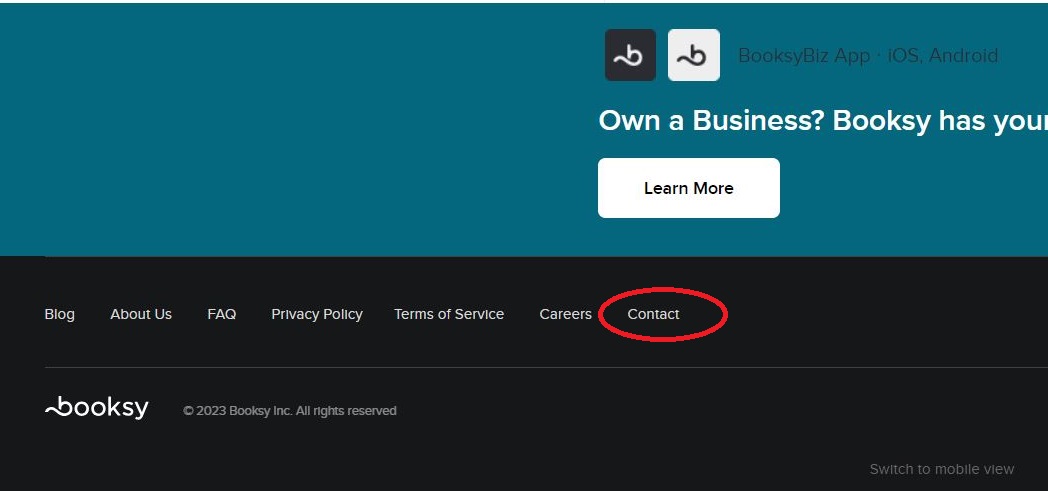
- Navigate to the Contact Us section: Scroll down to the bottom of the page and click on the “Contact Us” button.

- Provide Your Information: On the Contact Us page, fill in the required fields. Enter your full name under “Name.” Input your registered email address. In the message section, type: “I would like to delete my Booksy account.”
- Submit Your Request: Once you’ve filled in the necessary details and expressed your request clearly, click on the “Send Message” button.
- Confirmation: Await for confirmation from Booksy team
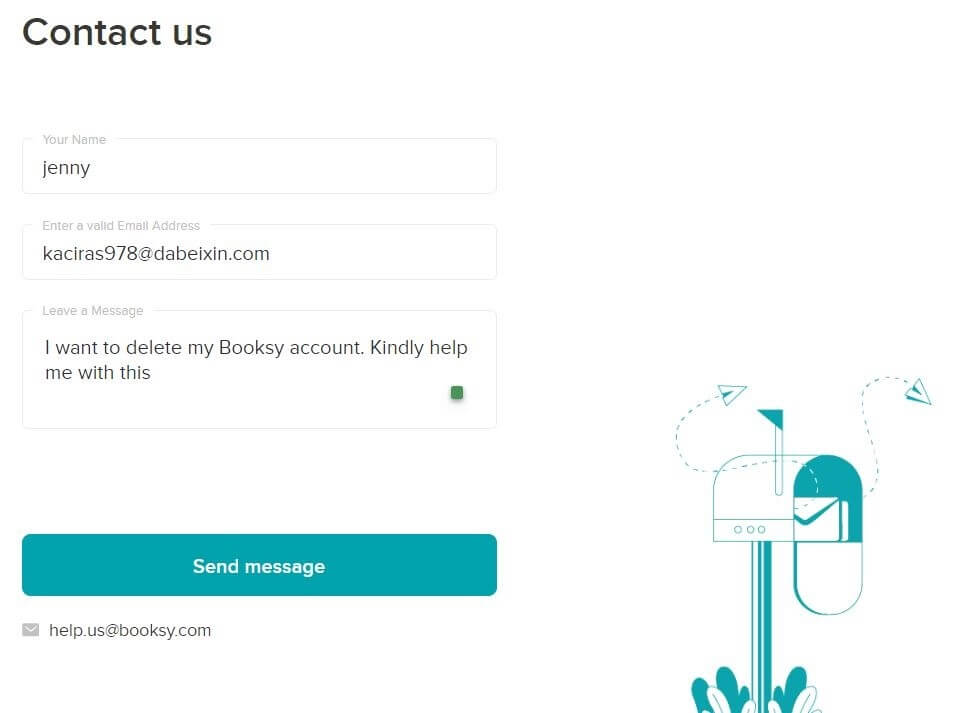
Note: Please note that the account deletion process may take a few days to complete. You will receive a confirmation once the deletion is complete from the Booksy support team.
Method 3: How to delete Booksy account through a Phone call
For a swift deletion of your Booksy account, the most efficient method is to reach out to our Customer Representative through the dedicated Helpline at +(206) 735-3553.
Ensure a seamless process by having essential details like your user ID, email ID, and account name ready before initiating contact.
Your account will be promptly canceled upon submitting your deletion request. Opt for this convenient approach to efficiently manage your Booksy account removal.
FAQ’S
How do I cancel Booksy?
To cancel Booksy write a detailed mail to [email protected] or fill out the form here mentioning you want to cancel Booksy.
Can I use Booksy without the app?
Yes, you can use Booksy without the app. Booksy provides both a web platform and a mobile app, providing you with the flexibility of how you want to access it.
Can someone block you from booking on Booksy?
Yes, the professionals have the option to block you if they find it necessary on Booksy.
Can a barber block you on Booksy?
Yes, a barber can block you on Booksy.
Can you book twice on Booksy?
You can have only one appointment with a specific professional at a given point in time.
Conclusion
As we wrap up this guide on how to delete Booksy account, remember that taking control of your online choices should be as simple as booking a haircut.
Whether you opted for the ease of an email or the direct route through the website, you’re now in the driver’s seat of your digital journey. If you ever decide to return, the beauty of choice is always at your fingertips.
Until then, here’s to managing your bookings and digital experiences with the same confidence you show in the barber’s chair. Happy managing!